| Author |
Message |
gNsoft2kPlus5
Guest
|
 SA 14 cannot be registered in SSMS 22 SA 14 cannot be registered in SSMS 22 |
 |
Hello, I have a problem with the SA 14, upon installation completion it cannot be registered, it cannot be registered to be used by SSMS 22. And it shows me the following messages:
---------------------------
SQL Assistant - Warning
---------------------------
Unable to register SQL Assistant Add-On because of insufficient privileges available to the current process. To correct this issue, please modify properties of the shortcut SQL Assistant and tick "Run as Administrator" check-box.
---------------------------
Aceptar
---------------------------
---------------------------
SQL Assistant - Warning
---------------------------
Insufficient privileges to install SQL Assistant add-ons for all users. To install SQL Assistant add-ons for all users, run this process in Run as Administrator mode.
Would you like to install add-ons only for current user?
---------------------------
Sí No
---------------------------
And it stays there as if in a loop, selecting Yes results in the same messages appearing over and over again, and in the end, it is not registered and cannot be used from SSMS 22.
The support area suggested that I run the following:
This sounds from the warning you are facing a permission error. Installing SQL Assistant Add-on for SSMS 22 requires administrative privileges (a change resulting from backward incompatible SSMS addon installation methods)
Insufficient privileges to install SQL Assistant add-ons for all users. To install SQL Assistant add-ons for all users, run this process in Run as Administrator mode.
Please try the following.
Start SQL Assistant in Run as Administrator mode
C:\Program Files (x86)\SQL Assistant 14\bin\sqlassist.exe
Open the main Options dialog from the system tray
Select SQL Server Management Studio on the Targets tab
Expand Advanced options on the right
Change Register Add-on option to No
Click the Apply button
Change Register Add-on option to Yes
Click the Apply button again
Start SSMS 22 and open a Query Editor in SSMS 22. Verify SQL Assistant add-on is active
I did as indicated but I still cannot register in SSMS 22.
Please help.
Thank you.
|
|
| Thu Mar 12, 2026 2:12 pm |
|
 |
SysOp
Site Admin
Joined: 26 Nov 2006
Posts: 8050
|
|
| |
|
Hi,
Do you have local administrator privileges?
What makes SSMS 22 add-on different from previous versions, it needs to add and update files in Program Files where SSMS is installed. That requires SQL Assistant started in Administrator mode.
Also it's possible that freezing is caused by your anti-virus blocking updates. Have you checked your anti-virus logs for related messages?
|
|
| Thu Mar 12, 2026 5:11 pm |
  |
|
hitesh
Joined: 15 Oct 2007
Posts: 105
|
|
| |
|
I am also facing the same issue and getting same error even though I have tick "Run as admin" option for SSMS and SA. SA menu is not showing up. It is not working until I manually register using Ctrl+Shift+F5 and this is annoying every time I start SSMS. SqlAssistant is also not loading during startup even though "load on startup" is set to yes.
|
|
| Fri Mar 13, 2026 12:36 am |
|
|
SysOp
Site Admin
Joined: 26 Nov 2006
Posts: 8050
|
|
| |
|
Please check your Windows UAC settings, antivirus (logs?), and permissions. From your description it seems like the setup isn't sticky, something is interfering and perhaps undoing changes. The issue is outside of the SQL Assistant.
|
|
| Wed Mar 25, 2026 9:08 am |
|
|
Vitaliy
Joined: 13 May 2015
Posts: 28
Country: Ukraine |
|
| |
|
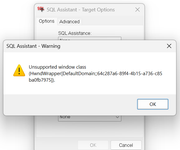
I also cannot start SQL Assistant with SSMS. Does the extension support SSMS v22.5.2?
When I click Ctrl+Shift+F5 I get this error
|
|
| Thu Apr 30, 2026 6:53 am |
|
|
SysOp
Site Admin
Joined: 26 Nov 2006
Posts: 8050
|
|
| |
|
The message indicates that the extension has not been started by SSMS. Were the any installation errors like setup complaining it cannot install files into SSMS extensions folder? Did you select the extension to be installed or tried to add it add-hoc after upgrading SSMS?
|
|
| Thu Apr 30, 2026 8:48 am |
|
|
SysOp
Site Admin
Joined: 26 Nov 2006
Posts: 8050
|
|
| |
|
Look for files in [SSMS installation folder]\Release\Common7\IDE\Extensions\SqlAssist folder. If you see files there, it's a sign the extension was installed. Else, it wasn't.
|
|
| Thu Apr 30, 2026 8:58 am |
|
|
Vitaliy
Joined: 13 May 2015
Posts: 28
Country: Ukraine |
|
| |
|
I installed SSMS 22 alongside with v20. Uninstalled SA v13. Installed v14 and I see SA files in the ProgramFiles and in the SSMS folder (c:\Program Files\Microsoft SQL Server Management Studio 22\Release\Common7\IDE\Extensions\SqlAssist\). SA is currently working in the SSMS v20 but not in the v22.
|
|
| Thu Apr 30, 2026 9:01 am |
|
|
Vitaliy
Joined: 13 May 2015
Posts: 28
Country: Ukraine |
|
| |
|
Tried many approaches (deleted privateregistry.bin, ran SSMS with /setup, deleted ComponentCache, reinstalled SA). I don't know exactly what stage helped but now it works.
|
|
| Thu Apr 30, 2026 10:56 am |
|
|
SysOp
Site Admin
Joined: 26 Nov 2006
Posts: 8050
|
|
| |
|
Thank you for the status update. I hope it can help other people who experience similar unexpected issues.
|
|
| Fri May 01, 2026 8:36 am |
|
|
|



