|
SoftTree Technologies
Technical Support Forums
|
|
| Author |
Message |
gemisigo
Joined: 11 Mar 2010
Posts: 2195
|
|
 [FR] Copy the CREATE script of a result set [FR] Copy the CREATE script of a result set |
 |
It would be great if we could "convert" result sets to CREATE TABLE scripts yielding the same structure, either the whole shebang or only using the selected columns. It could be triggered from the context menu or with an icon on the result tab toolbar; there's plenty of unused space there.
|
|
| Wed Mar 11, 2026 7:46 am |
  |
 |
SysOp
Site Admin
Joined: 26 Nov 2006
Posts: 8050
|
|
| |
|
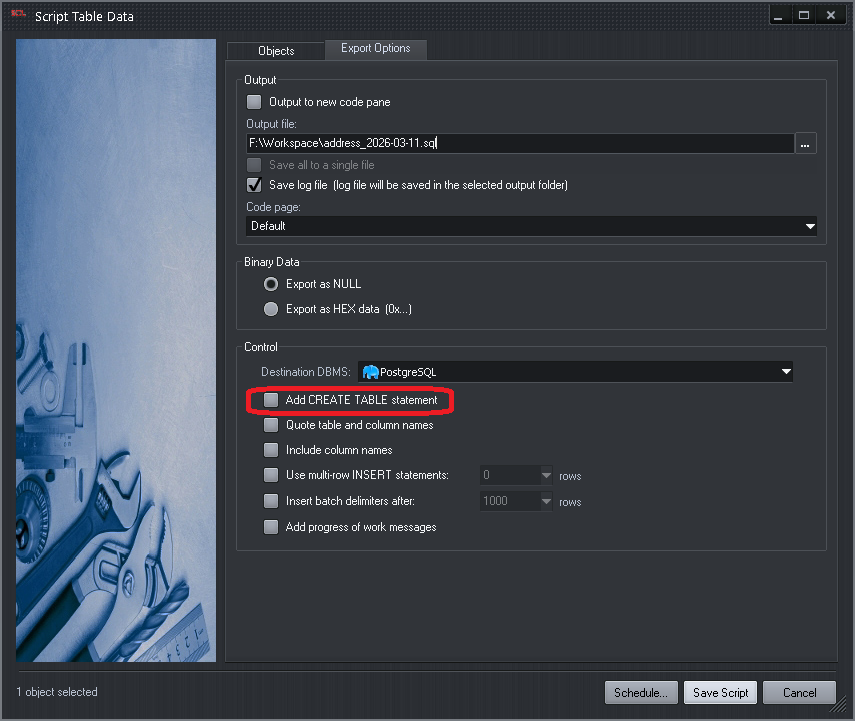
Isn't that what Save as Script -> "Export Options" tab -> "Add CREATE TABLE statement" does?
|
|
| Wed Mar 11, 2026 8:34 am |
|
|
SysOp
Site Admin
Joined: 26 Nov 2006
Posts: 8050
|
|
|
| Wed Mar 11, 2026 8:40 am |
|
|
gemisigo
Joined: 11 Mar 2010
Posts: 2195
|
|
| |
|
Not really. While it can include the CREATE TABLE for the result set, that one is primarily for data export (as said on the tin). Thus, it opens a dialog, asks for a bunch of settings, needs to be rerouted to a code pane, and it has to be copied back to the editor (which is still faster than opening the file to copy from), and comes with a bunch of unwanted INSERT statements (so it's potentially dangerous).
Also, it only works on a single statement. If the result set is a result (pun intended) of a multi-statement query, it is disabled. Even the slightest complexity can make it go away, for example:
 |
|
SELECT * FROM sys.[certificates] AS c
|
works
|
|
SELECT TOP(10) * FROM sys.[certificates] AS c
|
doesn't.
Run those two at the same time (giving 2 result sets) and even the first one has that feature disabled.
EDIT:
What I had in mind is you run an arbitrarily complex query, it yields result set(s), you pick the result set you want, right-click on it and pick a context menu item Copy CREATE TABLE. Or use a button on the result set toolbar for the same effect. With optionally selecting a few columns, and have only those included with the delimited column names and data type, put nicely on the clipboard. Or inserted into the editor at the current caret location (which is sadly not very well visible). Or both.
EDIT2: all the required thingies are already available in Execute / Find column in Results which opens the Grid Columns dialogs.
|
|
| Wed Mar 11, 2026 10:45 am |
|
|
SysOp
Site Admin
Joined: 26 Nov 2006
Posts: 8050
|
|
| |
|
True, grid columns maybe different. The current workaround is to save resultset from a grid to workspace database, which creates a new table based on grid columns definitions. From there the table can be transfered to another database, or scripted to a file. It does require more than a few click though.
|
|
| Wed Mar 11, 2026 2:40 pm |
|
|
gemisigo
Joined: 11 Mar 2010
Posts: 2195
|
|
| |
|
Yes, hence the feature request. Currently, I open Grid Columns , select the column definitions I need/want, copy, paste into the editor, and beat them into submission manually. I tried using Advanced Text Processor for the job, but while the regex pattern is valid and should work:

Unfortunately, it does not:

So, after wasting more than an hour, I gave up.
|
|
| Wed Mar 11, 2026 4:21 pm |
|
|
SysOp
Site Admin
Joined: 26 Nov 2006
Posts: 8050
|
|
| |
|
I really have no idea, why "Save as Script..." is enabled only in cases of data returned from a single table and the source of data is known to the grid, so it can generate the INSERT script for that table. Maybe something is reused internally. Considering that it's able to generate a similar script to save results to a fresh table in the workspace database, why not save the same script to a file?
I will raise that internally, doesn't make much sense to me.
|
|
| Thu Mar 12, 2026 8:28 am |
|
|
gemisigo
Joined: 11 Mar 2010
Posts: 2195
|
|
| |
|
That's a good idea, I bypassed that issue by redirecting result sets to tables and then exporting the table directly, it would be great if this worked without this extra step.
But please, also consider the feature request. The Save as Script... and saving the result set to the workspace database generate the CREATE TABLE almost as a "side-effect", and retrieving it takes effort. The requested feature wants only that "side-effect".
|
|
| Thu Mar 12, 2026 9:06 am |
|
|
|
|
You cannot post new topics in this forum
You cannot reply to topics in this forum
You cannot edit your posts in this forum
You cannot delete your posts in this forum
You cannot vote in polls in this forum
|
|
|